ChatGPT ads in 20.1% of answers: ad tracking features to look for
ChatGPT went from no ads to ads in a fifth of web-search answers within 90 days. The features an AI ad tracking tool needs, and what to ask before you buy.
Until May 27, 2026, Promptwatch saw no ads at all in ChatGPT's web-search answers. That day they appeared in 1.69% of them. By July 1 the daily rate had jumped past 30% and stayed in that range. Across the full 90 days from May 20 to August 17, 2026, 20.1% of ChatGPT web-search responses carried at least one ad, according to Promptwatch's ChatGPT ads over time report.
The 20.1% in the title, from the same report (May 20 to Aug 17, 2026), needs two qualifiers. It counts only responses where ChatGPT searched the web, returned at least one citation, and completed ad extraction. And as an average over 90 days that started with a week of zero ads, it understates the rate since July. If your category's questions trigger ads, competitors may be buying their way into answers where you are trying to earn a place. You can't respond to that if you can't see it.
What the report shows
The daily rate has reached as high as 43.9%. After a brief spike on June 25 and 26, the rate jumped past 30% on July 1, in a move the page says "stuck". Since then it has mostly sat "between the low 20s and high 30s". The stat cards on the page show 32.4% for the past seven days and 29.6% for the past 30 days, against the 90-day 20.1%, all with the window ending August 17, 2026 (ads report).
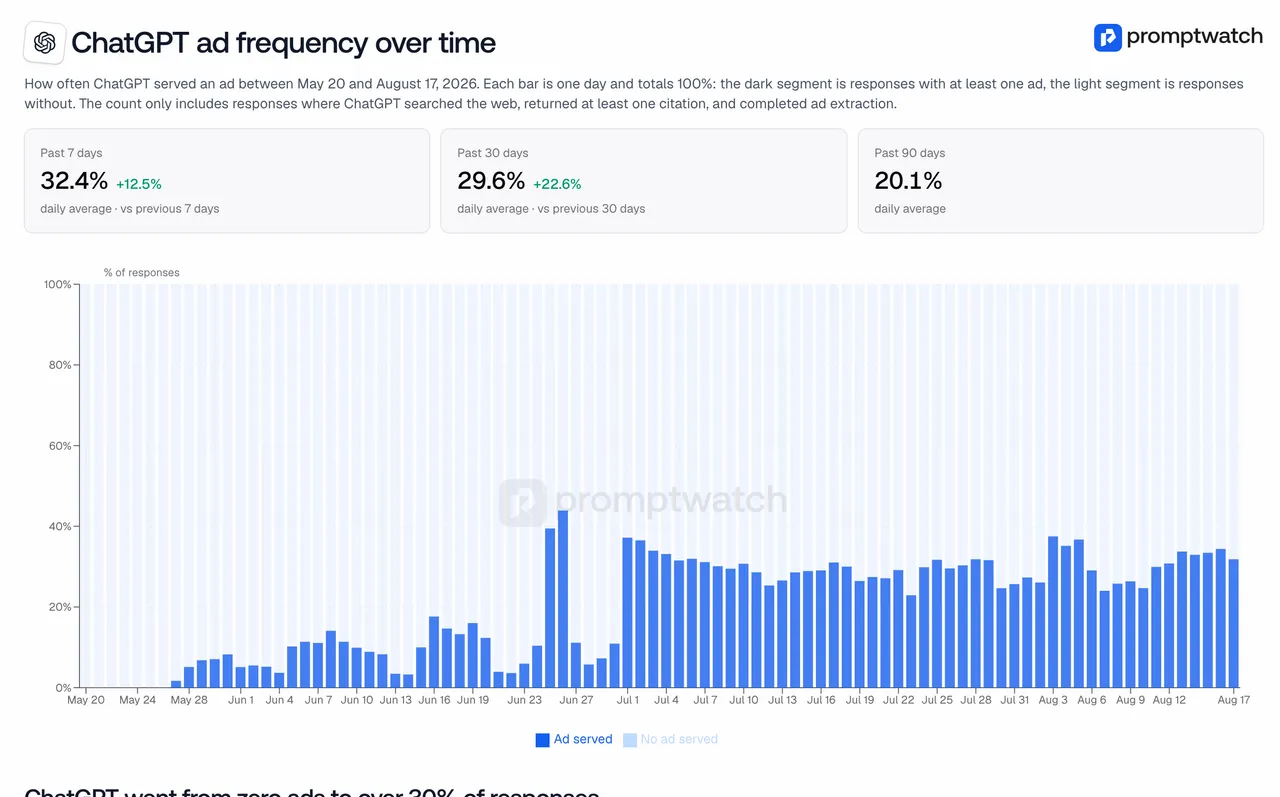 Promptwatch's "ChatGPT ad frequency over time" chart (May 20 to Aug 17, 2026), captured November 14, 2026.
The report also splits ad-bearing responses by prompt type. On an average day, 73.1% were organic prompts, 17.9% brand-specific prompts, and 9.1% competitor comparisons (May 20 to Aug 17, 2026, same report). The page is explicit that this "is a volume mix: it shows where the ads appeared, not how likely each prompt type is to trigger one." Adding more organic prompts to a monitor raises their share even if nothing changed on OpenAI's side, and days without ads are left out of that chart. So don't read 73.1% as "organic prompts are most likely to show ads." Read it as "most of the ads we saw were on organic prompts, because most prompts were organic."
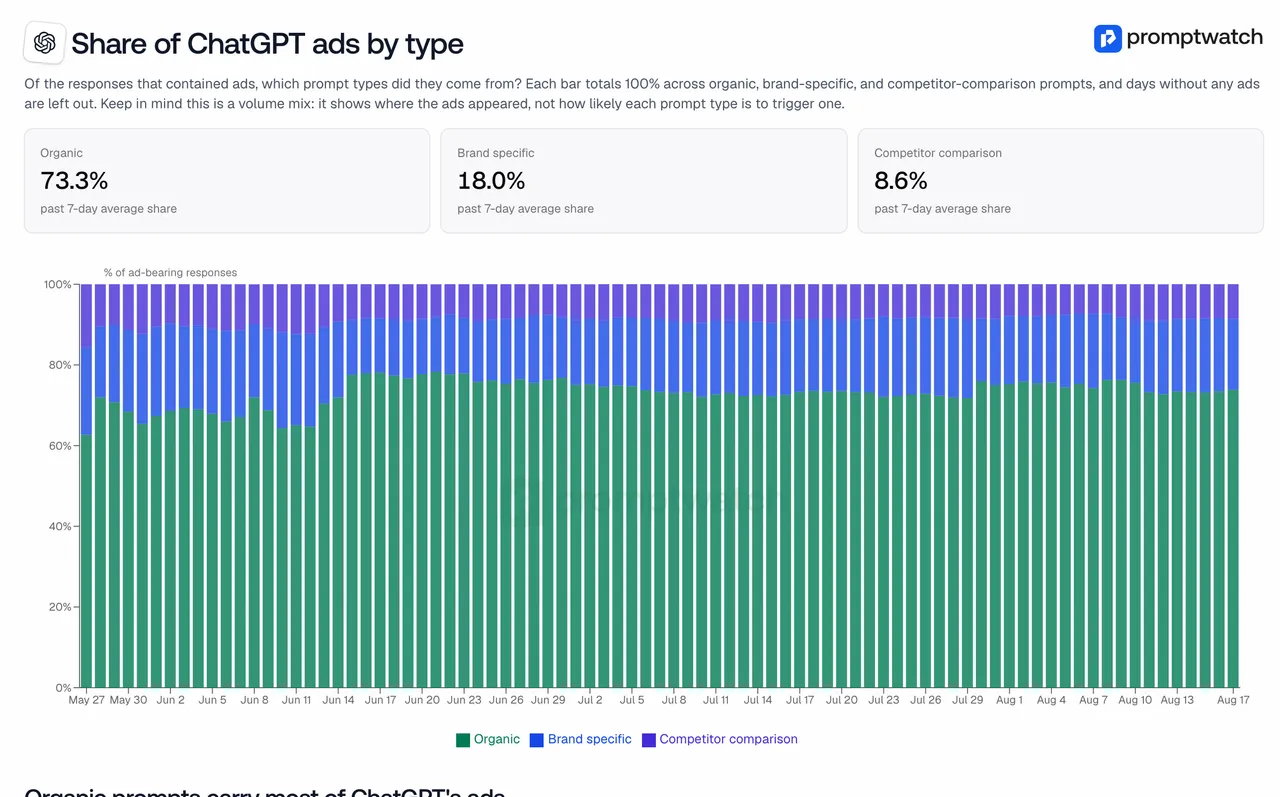 Promptwatch's "Share of ChatGPT ads by type" chart (May 20 to Aug 17, 2026), captured November 14, 2026.
We went deeper on reading the rate and the mix in sponsored placements in AI answers. This post is about the software.
Why ad tracking belongs in a GEO tool
Our interpretation: once a fifth to a third of web-search answers carry ads, the organic answer is no longer the only thing a buyer sees. An ad can sit next to a recommendation of your brand, or next to an answer that never mentions you. Those are different problems, and you only see them if your visibility tracking and your ad tracking run on the same prompts.
There is also a practical reason to keep them together. The report says ad presence varies day to day and recommends checking ad visibility across several days, because a single run can land on an outlier day. A tool that already runs your prompts daily is in a good position to capture ads on the same schedule.
Ad tracking features to look for
Here is the checklist, with the reason for each item.
- Capture from the live answer. Ads are a feature of the ChatGPT interface, so a tool that only queries a model API won't see them.
- Ads tied to your tracked prompts. The useful question isn't "how many ads does ChatGPT show" but "which ads appear on the questions my buyers ask".
- Full ad detail. Advertiser name and domain, ad title and copy, image or price, the target URL, and the landing page. Without the landing page you can't see the offer.
- The triggering prompt for every ad, so you know which questions competitors are paying to appear on.
- Your own visibility next to the ad count, per prompt. A prompt with many ads where you rank well is a different situation from one where you're absent.
- Prompt-type filters, so you can compare advertisers within organic, brand, and comparison prompts, which is the fair comparison given the volume-mix caveat.
- Daily history, ideally more often, since ad rates move day to day.
- Coverage beyond ChatGPT where ads exist, such as Google AI Overviews and AI Mode.
- Clarity on what isn't covered. You should know which engines are left out and whether the tool reports on your own ad campaigns.
Questions to put to the vendor
- "Do you capture ads from the ChatGPT interface, and on which other engines?"
- "Show me the ads that appeared on my prompts last week, with advertiser and landing page."
- "Can I see, per prompt, how many ads appeared and what my visibility was?"
- "Can I filter ads by prompt type and by advertiser domain?"
- "Does this report on my own OpenAI ad campaigns, or only on what appears in answers?"
- "Which plan includes ad tracking, and does the agency plan include it?"
That fifth question is a good honesty check. A tool that watches answers can't see your campaign's spend or conversions; that belongs to OpenAI's own ad tools.
How Promptwatch's Ads Radar maps to the list
Promptwatch covers ad tracking with Ads Radar. It captures sponsored ads inside ChatGPT Search, Google AI Overviews, and Google AI Mode answers to your tracked prompts. For each ad it records the title, description, image or price, advertiser name and domain, target URL, triggering prompt, ad copy, claims, and landing pages. Views include ads per day, top advertisers, By Ad, and By Prompt, which shows ad count, your average visibility, and the latest ad for each prompt. Filters cover model, advertiser domain, prompt type, and date range.
It is equally clear about the gaps. Ads Radar doesn't cover Perplexity, and it doesn't report on your own OpenAI campaigns; that's OpenAI Ads Manager. Since November 6, the Agent Chat side panel also works on the Ads Radar page, so you can ask questions of the ad data you're looking at.
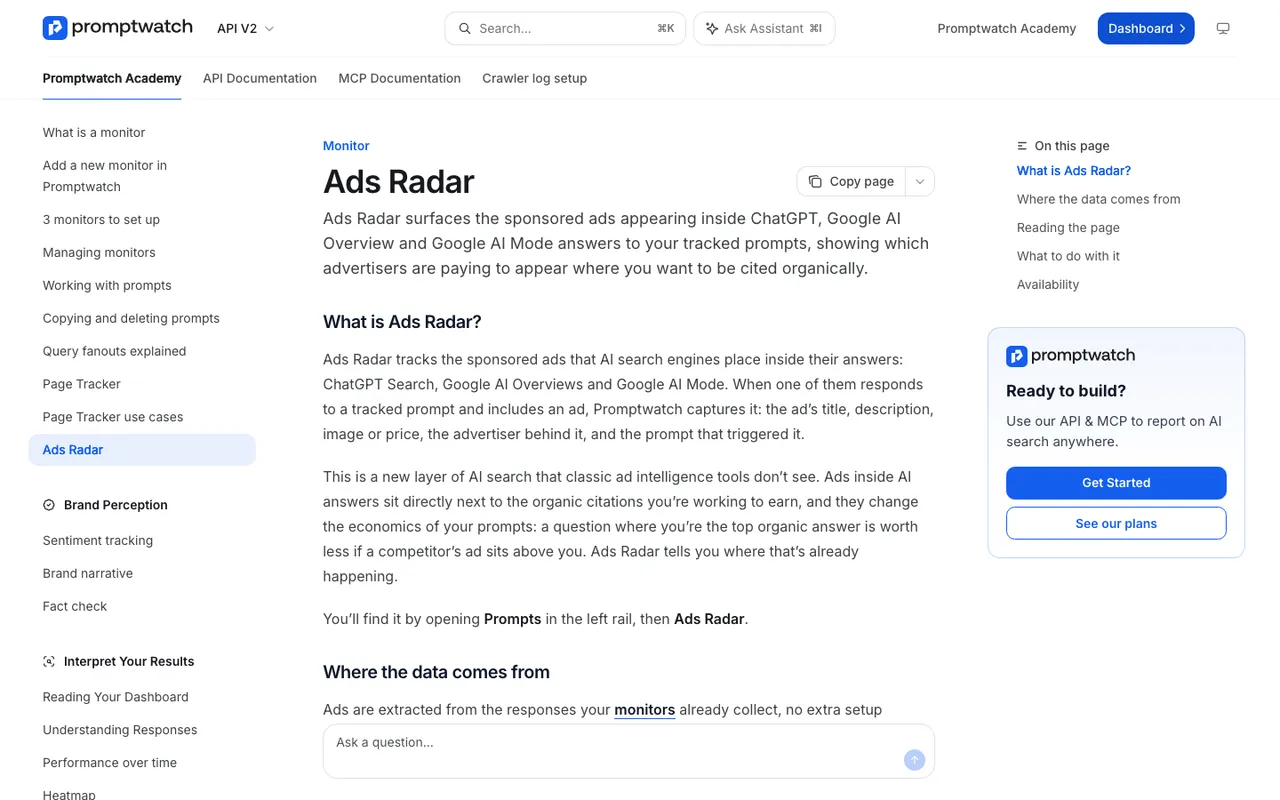 Promptwatch Academy's Ads Radar page (Business, every agency plan, and Enterprise), captured November 14, 2026.
On plans: Ads Radar starts on Business at $579 a month for brands, and it is included on every agency plan, from Kick-off at $199 a month, as well as Enterprise. Business also allows tracking every 12, 6, or 1 hours instead of daily, which helps if you want to catch ads across the day. Essential and Professional brand plans don't include Ads Radar.
For finding which questions draw ads in the first place, see how to find which prompts trigger ChatGPT ads.
What the alternatives offer
Our catalog entries for AthenaHQ, Scrunch AI, and Profound don't describe a feature that captures sponsored ads inside AI answers. That may change, so put the questions above to each vendor. Based on what's published, Promptwatch is the tool on our list that ties ad capture to the same prompts and visibility metrics you already track.
The upshot
ChatGPT ads went from none before May 27 to 20.1% of web-search responses over May 20 to August 17, 2026, with the last seven days of that window at 32.4% (Promptwatch ads report). If your buyers ask ChatGPT about your category, someone may already be advertising on those answers. Book a Promptwatch demo at promptwatch.com/book-a-demo and ask to see Ads Radar run on your own prompts.