Features to look for in AI brand perception software
A feature-by-feature checklist for AI brand perception software: what each capability should do, what to doubt in a demo, and which Promptwatch plan includes it.
Every perception demo opens on a radar chart. The shape is pleasing, the colors are well chosen, and the brand on screen belongs to the vendor's sample account. Twenty minutes later you've learned that the tool can draw a radar chart. Whether it can tell you why Perplexity keeps calling your product "hard to set up" is still open.
This checklist is meant to keep that from happening. It goes through the features that separate real AI brand perception software from a visibility tracker with a sentiment column bolted on. For each one we explain what it should do, what to doubt when a salesperson shows it, and where it sits in Promptwatch, the platform we use as the reference because it publishes plan-by-plan detail for all of them.
A working definition first. Visibility is whether an AI engine names you. Perception is how it describes you once it does: the attributes it assigns, the claims it repeats, the comparisons it draws and the tone it takes. Software that only measures the first half is useful. It just isn't what this list is about.
Claim extraction with verbatim quotes
The base feature. The tool should read each tracked answer and pull out the individual statements it makes about your brand: "integrates with HubSpot", "support is slow on weekends", "the free tier is limited to three users". Each claim needs the exact sentence it came from, a count of how often AI repeats it, and the models that said it.
In a demo, be wary of summaries without quotes. If the tool says "AI perceives you as premium" and can't show the sentences behind that, the summary may be the vendor's model interpreting the answer rather than the answer itself. Ask to click through to the source response.
Promptwatch does this in Brand Narrative, which is on every plan. A claim is kept only if its quote appears word for word in the response and is at least four words long, and claims about untracked brands are left out. Claims that state a price and fragments of shopping cards are dropped on purpose, because they change too often to form a useful narrative.
Theme grouping and a defined score
Raw claims pile up quickly. Grouping them into themes is what lets you say "our pricing story is weak but our support story is strong". The score attached to each theme needs a definition you can repeat to your boss.
A score with no published scale is a warning sign. "Perception: 74" means nothing until you know whether 50 is neutral, whether thin mentions count, and whether repeated claims weigh more.
Promptwatch uses nine fixed themes (Pricing, Features, Quality, Usability, Range, Support, Reputation, Audience, Company). Each quote scores 0 to 100, with below 40 negative and 60 and up positive. A theme's score is the average over every quote in it, so a claim repeated daily counts more than a one-off. Fixed themes have a trade-off: you can't add a "Sustainability" theme of your own, but scores stay comparable across brands and over time.
Competitors under the same rules
A theme score means little alone. You need the same extraction and scoring run on competitors, with a view that puts the brands side by side per theme.
Watch for competitor data that comes from a different pipeline, or that stops at share of voice. Ask whether competitor claims are extracted with the same rules as yours.
Brand Narrative collects claims for tracked competitors too. The Benchmark view lists your themes, best first, with your rank among competitors and the gap to the leader. The Heatmap puts every brand against every theme in one grid.
Fact checking against your own pages
The feature that turns perception data into a work list. The tool should take a claim, search your site and the pages AI cites for sentences that state it or the opposite, and show the evidence.
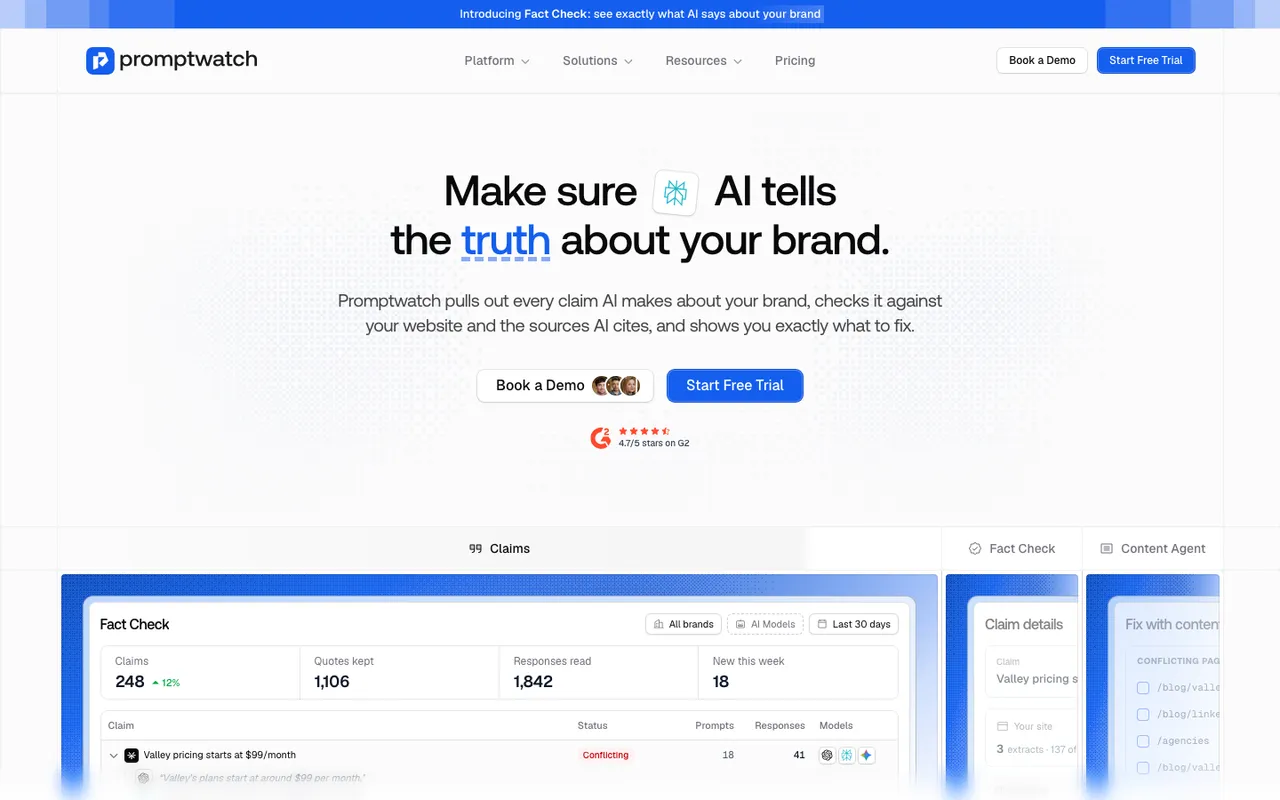 Promptwatch's Fact Check feature page, captured November 14, 2026. The claims table is the vendor's product illustration with example data.
Treat any promise that the software knows what's true with suspicion. It can only report what pages say. Be careful with price checking as well: some products, Promptwatch included, keep price claims out of the narrative, so verify exact wrong prices by reading the responses.
Promptwatch's version is Fact Check, on Business ($579 a month), Agency Scale ($799) and Enterprise. You mark a claim Accurate or Inaccurate and a check runs, usually in one to two minutes, using Agent Credits with an estimate shown first. It reads every page of your site and up to 50 of the most-cited pages, then assigns one of five outcomes: Confirmed, Leans confirmed, Conflicting, Leans conflicting or Inconclusive. Inconclusive is often the useful one, because it means AI keeps saying something your site never addresses. An accuracy score from 0 to 100 tracks progress, and a heatmap called "Where does AI get it wrong?" breaks it down per model and theme.
A route from finding to fixing
Spotting a wrong claim is half the job. The other half is changing the page that feeds it.
"Recommendations" that stop at advice don't count. Ask to see the next screen after a claim is marked wrong.
From a Promptwatch Fact Check result, "Fix with content agent" opens a Content Refresh for the flagged pages, with the sentences to rewrite attached and a required "What's actually true?" field. The agent is instructed to remove the wrong claim without repeating it, even as a denial. The feature page says you can refresh up to 10 pages at once. Each refreshed page uses an AEO article from the plan quota, so this works on brand plans with AEO articles (Professional and up) and not on agency plans, which have none.
Topic-level metrics
Perception varies by subject. AI can describe you warmly on "best tools for agencies" and coolly on "cheapest tools for freelancers". A good tool lets you read perception metrics per topic, not only as one blended number.
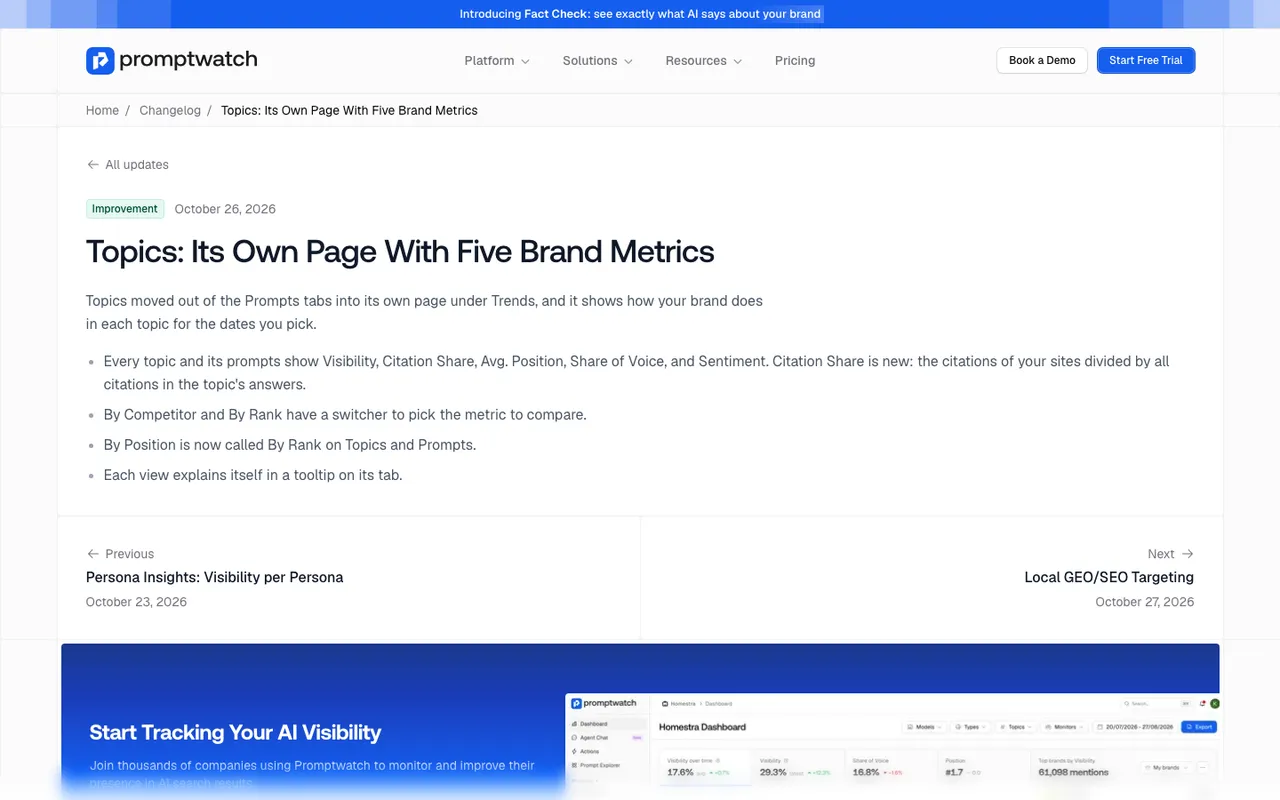 Promptwatch changelog entry for the Topics page, captured November 14, 2026.
Check that a topic filter recalculates the metrics, not just the prompt list.
Promptwatch's Topics page shows five metrics for every topic and its prompts: Visibility, Citation Share, Avg. Position, Share of Voice and Sentiment. Citation Share is your own sites' citations divided by all citations in that topic's answers. By Competitor and By Rank views have a switcher to choose the metric you compare on.
Persona and location splits
Two buyers asking the same question can get different answers. A CFO and an IT lead hear different strengths emphasized, and an answer in Germany may lean on different sources than one in the US.
Some tools offer personas that are only labels on prompts, with no separate results to compare.
In Promptwatch, Persona Insights draws a radar per persona against the general audience (answers that ran without a persona), with a card that names the persona with the biggest gap and its weakest topic or model. Persona stacking wraps the persona context around a prompt before it's sent. Country-level tracking is on every paid plan, state and city on Business and agency plans, and coordinate-level local targeting on Business, Agency Scale and Enterprise.
Per-model breakdowns
Blended averages hide the platform where you're losing. You may be described well by ChatGPT and poorly by Gemini, and one combined score shows neither.
A single perception score with no model filter should end the demo early.
Brand Narrative has a "Brand sentiment by model" radar next to the theme radar, and the filter bar at the top of the page (monitors, models, prompt types, date range) applies to everything below it. The sentiment score is filterable by model too.
Exports and data access
Perception data ends up in board decks and BI tools. Ask how it leaves the product.
"Export" sometimes means a screenshot. Ask for a CSV of claims or responses during the demo.
Promptwatch offers Excel and CSV exports with a column picker, PDFs of any dashboard, 10 scheduled PDF reports on every brand plan, Looker Studio from Professional, and the REST API and MCP server on every paid plan. Whether Brand Narrative claims are exposed through the API isn't stated in the documentation we read, so ask if that's your use case.
The checklist mapped to plans
| Feature | Promptwatch plan |
|---|---|
| Claim extraction, themes, competitor benchmark | Every plan (Brand Narrative) |
| Sentiment score with model and prompt type filters | Every plan |
| Topics page with five metrics | Every plan |
| Country-level tracking | Every paid plan |
| Crawler logs to see if AI can read the corrected page | Professional ($245) and up |
| Content Refresh with AEO articles | Professional and up |
| Fact Check and accuracy score | Business ($579), Agency Scale ($799), Enterprise |
| State, city and coordinate targeting | Business and up |
| Automated Content Agent | Business and Enterprise |
What this means for your shortlist
Score each vendor on the nine features above with your own brand loaded, not the sample account. Most tools will tick claim extraction in some form. Far fewer will tick fact checking and a fix route, and those two are what turn a perception report into changed answers over the following weeks. You can't force an engine to change its wording, but you can change the pages it reads.
If you want to see these features on your own brand before committing, book a Promptwatch demo and ask them to open Brand Narrative on your three most negative claims.